After [creating](/edge-ai/ai-infrastructure/create-a-virtual-gpu-cluster) a Virtual GPU cluster, use the cluster details page to monitor nodes, manage power state, configure disks and network interfaces, and delete cluster resources.
## Cluster details
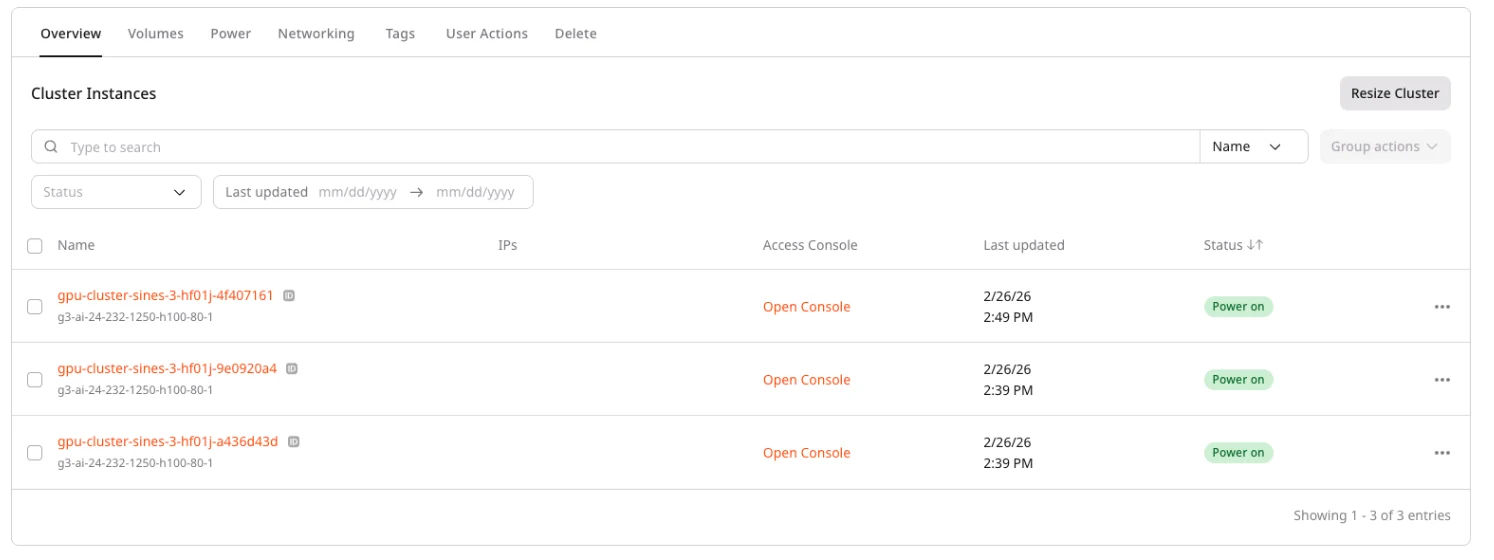
To view and manage an existing cluster, open the cluster details page.
1. In the [Gcore Customer Portal](https://portal.gcore.com), navigate to **GPU Cloud**.
2. Select the target region.
3. In the sidebar, expand **GPU Clusters** and select **Virtual GPU Clusters**.
4. Click a cluster name to open the details page.
 ## Cluster power state
Virtual GPU clusters support power management operations at the cluster level. Unlike Bare Metal clusters, powering off a Virtual GPU cluster releases compute resources (shelving), which stops billing but also removes data from local disks.
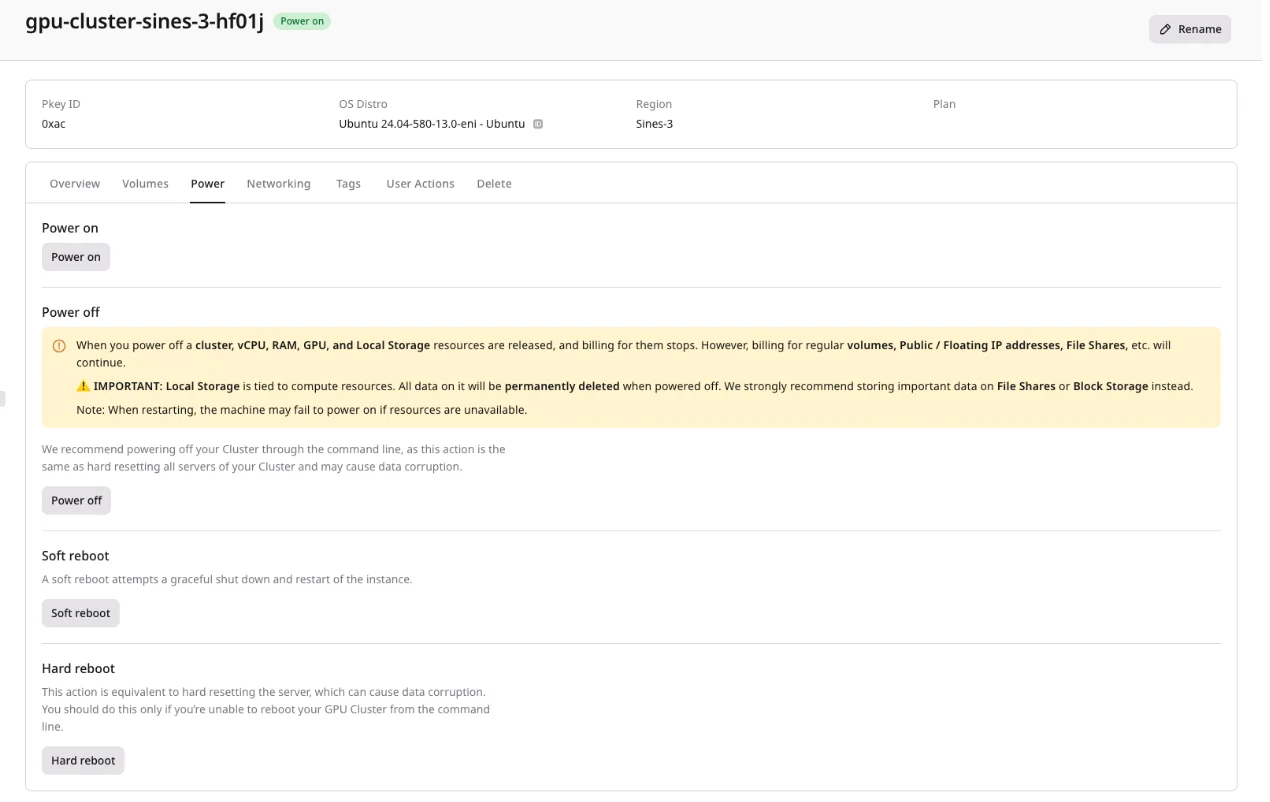 ### Power off (shelve) a cluster
Powering off a Virtual GPU cluster shelves all nodes. Shelving releases CPU, RAM, GPU, and local disk resources. No charges apply while nodes are shelved.
1. In the cluster list or cluster details page, locate the cluster.
2. Click the **Power Off** action.
3. Confirm the operation.
When a node is shelved, the local data disk is deleted and all data on it is lost. Only network disks persist. Save important data to network disks or external storage before powering off.
### Power on a cluster
Powering on a shelved cluster attempts to allocate resources for all nodes.
1. In the cluster list or cluster details page, locate the powered-off cluster.
2. Click the **Power On** action.
## Node disks
After cluster creation, disks can be managed individually for each node. This allows adding storage to specific nodes or removing unused disks.
### Add a disk to a node
Add a network volume to a specific node to expand its storage capacity.
1. Navigate to the cluster details page.
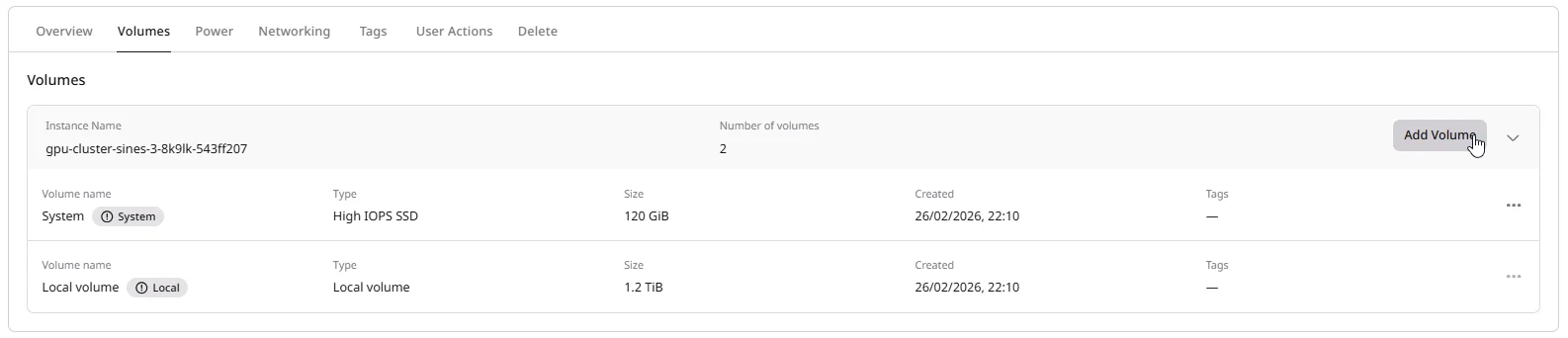
2. Open the **Volumes** tab.
3. Select the node to attach a disk to.
4. Click **Add Volume** and configure the disk type and size.
5. Click **Create** to attach the new disk.
 ### Remove a disk from a node
Detach a network volume from a node when it is no longer needed on that node.
1. Navigate to the cluster details page.
2. Open the **Volumes** tab.
3. Locate the disk to remove and click the detach action.
4. Confirm the operation.
Detaching a disk does not delete it. The disk remains in the account and continues to incur storage charges until explicitly deleted.
## Network interfaces
After cluster creation, network interfaces can be managed individually for each node through the **Networking** tab on the cluster details page.
### Add an interface to a node
Add an interface to connect a node to an additional network.
1. Navigate to the cluster details page.
2. Open the **Networking** tab.
3. Click a node to expand its details.
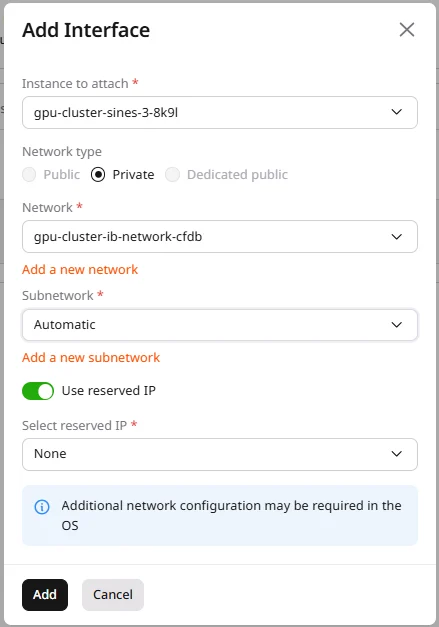
4. Click **Add Interface**.
5. Configure the **Network type** (**Public**, **Private**, or **Dedicated public**) and IP allocation settings.
 ### Remove an interface from a node
Remove an interface from a node when it is no longer needed.
1. Navigate to the cluster details page.
2. Open the **Networking** tab.
3. Click a node to expand its details.
4. Locate the interface to remove and click the delete action.
5. Confirm the operation.
InfiniBand interfaces cannot be removed or modified — they are managed automatically to maintain inter-node communication.
## Delete a cluster
When deleting a Virtual GPU cluster, disks attached to nodes can optionally be preserved.
Deleting the last node in a cluster automatically deletes the entire cluster. This applies to both the Customer Portal and API operations. When using the API or Terraform to delete nodes, no confirmation is shown before the cluster is removed. Keep at least one node to preserve the cluster.
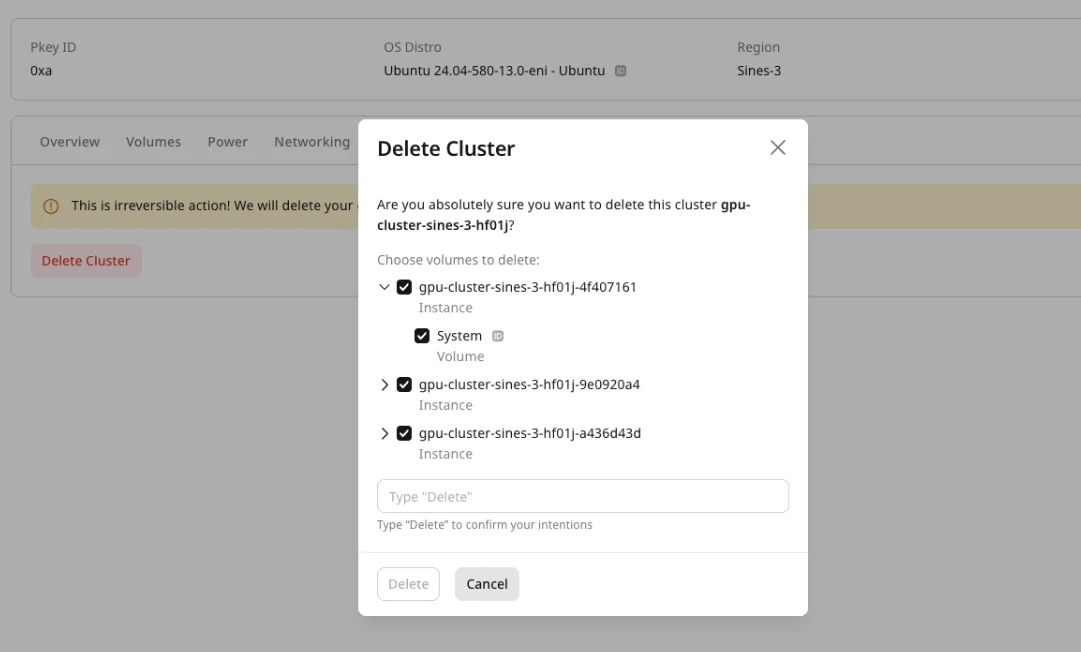 1. In the cluster list or cluster details page, click **Delete**.
2. In the confirmation dialog:
* To delete all disks along with the cluster, leave the **Delete disks** checkbox selected.
* To preserve disks for later use, clear the **Delete disks** checkbox.
3. Confirm the deletion.
Preserved disks remain in the account and continue to incur storage charges. They can be attached to other instances or clusters.
## Cluster automation
1. In the cluster list or cluster details page, click **Delete**.
2. In the confirmation dialog:
* To delete all disks along with the cluster, leave the **Delete disks** checkbox selected.
* To preserve disks for later use, clear the **Delete disks** checkbox.
3. Confirm the deletion.
Preserved disks remain in the account and continue to incur storage charges. They can be attached to other instances or clusters.
## Cluster automation
The Customer Portal is suitable for managing individual clusters. Automated workflows — CI/CD pipelines, infrastructure-as-code, or batch provisioning — are better served by the [REST API](/api-reference/cloud/gpu-virtual) or [Terraform](/developer-tools/terraform/overview).
Use the REST API to inspect virtual GPU clusters, control their power state, manage attached volumes and network interfaces, and automate cluster administration workflows.
An [API token](/account-settings/api-tokens) is required, along with a
[project ID](/api-reference/cloud/projects/list-projects)
and a [region ID](/api-reference/cloud/regions/list-regions).
Open a terminal and set these environment variables before running the examples:
```bash theme={null}
export GCORE_API_KEY="{YOUR_API_KEY}"
export GCORE_CLOUD_PROJECT_ID="{YOUR_PROJECT_ID}"
export GCORE_CLOUD_REGION_ID="{YOUR_REGION_ID}"
```
## List virtual GPU clusters
The list endpoint returns all clusters in a project and region. Query string filters — by name, flavor, node count, tags, and timestamps — are documented in the [API reference](/api-reference/cloud/gpu-virtual).
```python theme={null}
from gcore import Gcore
client = Gcore()
page = client.cloud.gpu_virtual.clusters.list()
for cluster in page.results:
print(cluster.id, cluster.name, cluster.servers_count, cluster.status)
```
The Python SDK `clusters.list()` does not expose filter parameters. To filter by name, flavor, node count, or tags, use the curl example with query string filters.
```go theme={null}
package main
import (
"context"
"fmt"
gcore "github.com/G-Core/gcore-go"
"github.com/G-Core/gcore-go/cloud"
)
func main() {
client := gcore.NewClient()
ctx := context.Background()
page, err := client.Cloud.GPUVirtual.Clusters.List(ctx,
cloud.GPUVirtualClusterListParams{})
if err != nil {
panic(err)
}
fmt.Printf("Total: %d\n", len(page.Results))
for _, c := range page.Results {
fmt.Printf(" %s %s nodes=%d\n", c.ID, c.Name, c.ServersCount)
}
}
```
The Go SDK `Clusters.List` does not expose filter parameters. To filter by name, flavor, node count, or tags, use the curl example with query string filters.
```bash theme={null}
curl -G "https://api.gcore.com/cloud/v3/gpu/virtual/${GCORE_CLOUD_PROJECT_ID}/${GCORE_CLOUD_REGION_ID}/clusters" \
-H "Authorization: APIKey ${GCORE_API_KEY}" \
--data-urlencode "name[prefix]=prod-" \
--data-urlencode "flavor[prefix]=g3-" \
--data-urlencode "servers_count[gte]=2" \
--data-urlencode "tags[env]=production"
```
Response:
```json theme={null}
{
"count": 1,
"results": [
{
"id": "0dd60286-6258-4594-91e3-f2938c1e3d3a",
"name": "prod-cluster-1",
"status": "active",
"flavor": "g3-ai-24-232-1250-h100-80-1",
"tags": [
{ "key": "env", "value": "production", "read_only": false },
{ "key": "team", "value": "ml", "read_only": false }
],
"servers_count": 2,
"created_at": "2026-06-17T18:32:55Z",
"updated_at": "2026-06-17T18:33:20Z",
"servers_ids": ["e34a6d40-f42a-4cb1-980b-022f06082df9"],
"has_pending_changes": false
}
]
}
```
Use `limit` and `offset` for pagination. The default page size is 10; the maximum is 1000.
## Get cluster details
Returns the full configuration and current status of a single cluster.
```python theme={null}
from gcore import Gcore
client = Gcore()
cluster = client.cloud.gpu_virtual.clusters.get(cluster_id="{CLUSTER_ID}")
print(cluster.id, cluster.name, cluster.status, cluster.servers_count)
```
```go theme={null}
package main
import (
"context"
"fmt"
gcore "github.com/G-Core/gcore-go"
"github.com/G-Core/gcore-go/cloud"
)
func main() {
client := gcore.NewClient()
ctx := context.Background()
cluster, err := client.Cloud.GPUVirtual.Clusters.Get(ctx,
"{CLUSTER_ID}",
cloud.GPUVirtualClusterGetParams{})
if err != nil {
panic(err)
}
fmt.Printf("%s %s nodes=%d\n", cluster.ID, cluster.Name, cluster.ServersCount)
}
```
```bash theme={null}
curl "https://api.gcore.com/cloud/v3/gpu/virtual/${GCORE_CLOUD_PROJECT_ID}/${GCORE_CLOUD_REGION_ID}/clusters/{CLUSTER_ID}" \
-H "Authorization: APIKey ${GCORE_API_KEY}"
```
Response:
```json theme={null}
{
"id": "058e03b4-c44b-4684-9075-810cb0354467",
"name": "prod-cluster-1",
"status": "active",
"flavor": "g3-ai-24-232-1250-h100-80-1",
"tags": [
{ "key": "env", "value": "production", "read_only": false }
],
"servers_count": 2,
"created_at": "2026-06-17T18:52:19Z",
"updated_at": "2026-06-17T18:52:44Z",
"servers_ids": ["0fce6b19-e523-42cf-a74c-571429009735"],
"servers_settings": {
"ssh_key_name": "my-key",
"interfaces": [{ "type": "external", "ip_family": "ipv4", "name": "pub_net" }],
"volumes": [{ "size": 50, "type": "ssd_hiiops", "boot_index": 0 }]
},
"has_pending_changes": false
}
```
## Control cluster power state
The `action` endpoint applies a power operation to all nodes in the cluster at once.
| Action | Description |
| ------------- | ---------------------------------------------------------------------------------------------- |
| `start` | Power on a shelved cluster and attempt to reallocate resources |
| `stop` | Power off (shelve) all nodes — releases GPU, CPU, RAM, and local disk resources; billing stops |
| `soft_reboot` | Send an ACPI shutdown signal and reboot |
| `hard_reboot` | Force-reset all nodes immediately |
`stop` permanently erases local disk data on all nodes. Save critical data to network volumes before stopping a cluster.
```python theme={null}
from gcore import Gcore
client = Gcore()
# Replace "stop" with "start", "soft_reboot", or "hard_reboot" as needed
task_id_list = client.cloud.gpu_virtual.clusters.action(
cluster_id="{CLUSTER_ID}",
action="stop",
)
print(task_id_list.tasks)
```
```go theme={null}
package main
import (
"context"
"fmt"
gcore "github.com/G-Core/gcore-go"
"github.com/G-Core/gcore-go/cloud"
)
func main() {
client := gcore.NewClient()
ctx := context.Background()
// Swap OfStop for OfStart, OfSoftReboot, or OfHardReboot as needed
taskIDList, err := client.Cloud.GPUVirtual.Clusters.Action(ctx,
"{CLUSTER_ID}",
cloud.GPUVirtualClusterActionParams{
OfStop: &cloud.GPUVirtualClusterActionParamsBodyStop{},
})
if err != nil {
panic(err)
}
fmt.Printf("%+v\n", taskIDList.Tasks)
}
```
```bash theme={null}
# Power off (stop) — replace "stop" with "start", "soft_reboot", or "hard_reboot"
curl -X POST \
"https://api.gcore.com/cloud/v3/gpu/virtual/${GCORE_CLOUD_PROJECT_ID}/${GCORE_CLOUD_REGION_ID}/clusters/{CLUSTER_ID}/action" \
-H "Authorization: APIKey ${GCORE_API_KEY}" \
-H "Content-Type: application/json" \
-d '{"action": "stop"}'
```
Response:
```json theme={null}
{ "tasks": ["7a0210ac-fd82-4c06-8e43-4ebdc2d3d1bc"] }
```
Poll `GET /cloud/v1/tasks/{task_id}` every five seconds until `state` is `FINISHED`.
## List cluster volumes
Returns all volumes currently attached to nodes in the cluster.
```python theme={null}
from gcore import Gcore
client = Gcore()
volume_list = client.cloud.gpu_virtual.clusters.volumes.list(cluster_id="{CLUSTER_ID}")
for vol in volume_list.results:
print(vol.id, vol.name, vol.size, vol.status)
```
```go theme={null}
package main
import (
"context"
"fmt"
gcore "github.com/G-Core/gcore-go"
"github.com/G-Core/gcore-go/cloud"
)
func main() {
client := gcore.NewClient()
ctx := context.Background()
vols, err := client.Cloud.GPUVirtual.Clusters.Volumes.List(ctx,
"{CLUSTER_ID}",
cloud.GPUVirtualClusterVolumeListParams{})
if err != nil {
panic(err)
}
fmt.Printf("Volumes: %d\n", len(vols.Results))
}
```
```bash theme={null}
curl "https://api.gcore.com/cloud/v3/gpu/virtual/${GCORE_CLOUD_PROJECT_ID}/${GCORE_CLOUD_REGION_ID}/clusters/{CLUSTER_ID}/volumes" \
-H "Authorization: APIKey ${GCORE_API_KEY}"
```
Response:
```json theme={null}
{
"count": 1,
"results": [
{
"id": "e937b4c4-da8f-4d7d-b444-d331345a2039",
"server_id": "0fce6b19-e523-42cf-a74c-571429009735",
"name": "boot-disk",
"type": "ssd_hiiops",
"status": "in-use",
"size": 50,
"bootable": true,
"root_fs": true,
"created_at": "2026-06-17T18:52:22Z"
}
]
}
```
## List cluster network interfaces
Returns all network interfaces for every node in the cluster, including InfiniBand interfaces used for inter-node communication.
```python theme={null}
from gcore import Gcore
client = Gcore()
iface_list = client.cloud.gpu_virtual.clusters.interfaces.list(cluster_id="{CLUSTER_ID}")
for iface in iface_list.results:
print(iface.port_id, iface.network.name, iface.ip_assignments)
```
```go theme={null}
package main
import (
"context"
"fmt"
gcore "github.com/G-Core/gcore-go"
"github.com/G-Core/gcore-go/cloud"
)
func main() {
client := gcore.NewClient()
ctx := context.Background()
ifaces, err := client.Cloud.GPUVirtual.Clusters.Interfaces.List(ctx,
"{CLUSTER_ID}",
cloud.GPUVirtualClusterInterfaceListParams{})
if err != nil {
panic(err)
}
fmt.Printf("Interfaces: %d\n", len(ifaces.Results))
}
```
```bash theme={null}
curl "https://api.gcore.com/cloud/v3/gpu/virtual/${GCORE_CLOUD_PROJECT_ID}/${GCORE_CLOUD_REGION_ID}/clusters/{CLUSTER_ID}/interfaces" \
-H "Authorization: APIKey ${GCORE_API_KEY}"
```
Response:
```json theme={null}
{
"count": 2,
"results": [
{
"port_id": "e79e8057-5929-4b79-90d4-d6d894d1fd13",
"mac_address": "fa:16:3e:01:59:f9",
"ip_assignments": [{ "subnet_id": "b0ba19bd-...", "ip_address": "85.234.66.234" }],
"network_id": "831179f2-9828-45a7-af0b-4ca2d0957920",
"network": { "name": "pub_net", "external": true }
},
{
"port_id": "b1d4862b-486e-456c-bd7f-c4672830d827",
"ip_assignments": [{ "subnet_id": "8fd1891e-...", "ip_address": "192.168.241.99" }],
"network": { "name": "gpu-cluster-ib-network-058e03b4-...", "external": false }
}
]
}
```
The `gpu-cluster-ib-network-*` interface is the InfiniBand network created automatically for inter-node communication. It cannot be removed or modified.
## Delete a cluster
Deletes the cluster and all associated servers. Pass `all_floating_ips=true` to release any floating IPs, `all_reserved_fixed_ips=true` to release reserved fixed IPs, and `all_volumes=true` to delete all attached volumes along with the cluster.
Deleting the last node in a cluster automatically deletes the entire cluster — no confirmation is shown when using the API.
```python theme={null}
from gcore import Gcore
client = Gcore()
task_id_list = client.cloud.gpu_virtual.clusters.delete(
cluster_id="{CLUSTER_ID}",
all_floating_ips=True,
all_reserved_fixed_ips=True,
all_volumes=True,
)
print(task_id_list.tasks)
```
```go theme={null}
package main
import (
"context"
"fmt"
gcore "github.com/G-Core/gcore-go"
"github.com/G-Core/gcore-go/cloud"
)
func main() {
client := gcore.NewClient()
ctx := context.Background()
taskIDList, err := client.Cloud.GPUVirtual.Clusters.Delete(ctx,
"{CLUSTER_ID}",
cloud.GPUVirtualClusterDeleteParams{
AllFloatingIPs: gcore.Bool(true),
AllReservedFixedIPs: gcore.Bool(true),
AllVolumes: gcore.Bool(true),
})
if err != nil {
panic(err)
}
fmt.Printf("%+v\n", taskIDList.Tasks)
}
```
```bash theme={null}
curl -X DELETE \
"https://api.gcore.com/cloud/v3/gpu/virtual/${GCORE_CLOUD_PROJECT_ID}/${GCORE_CLOUD_REGION_ID}/clusters/{CLUSTER_ID}?all_floating_ips=true&all_reserved_fixed_ips=true&all_volumes=true" \
-H "Authorization: APIKey ${GCORE_API_KEY}"
```
Response:
```json theme={null}
{ "tasks": ["task-uuid"] }
```
Poll `GET /cloud/v1/tasks/{task_id}` every five seconds until `state` is `FINISHED`.