> ## Documentation Index
> Fetch the complete documentation index at: https://docs.preprod.world/llms.txt
> Use this file to discover all available pages before exploring further.
# Manage a password
The [Gcore Hosting Portal](https://hosting.gcore.com/billmgr) provides two ways to manage the account password: changing it from the profile page while logged in, or recovering it by email if forgotten.
## Change a password
1. Log in to the Hosting Portal.
2. In the **Client** section of the sidebar, click **Profile**.
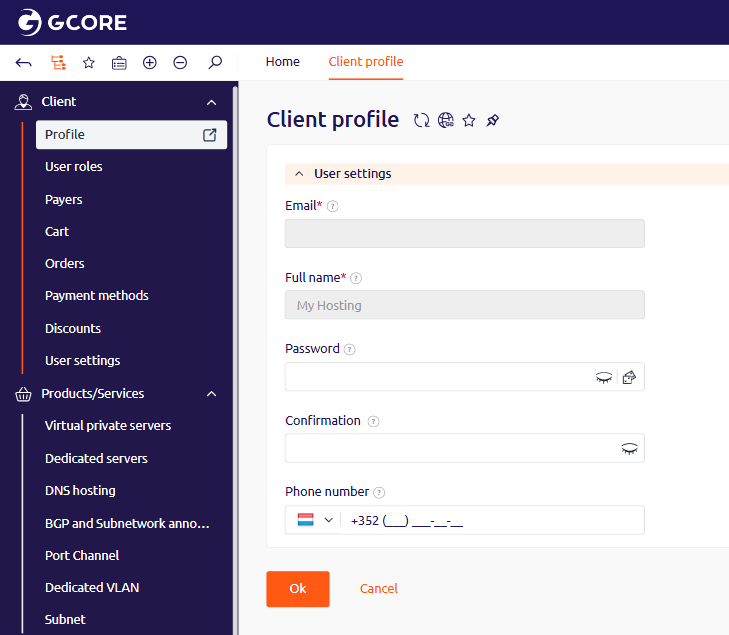 3. In the **Password** field, enter the new password. It must be at least eight characters long and include at least one uppercase letter and one digit.
4. In the **Confirmation** field, re-enter the new password.
5. Click **Ok**.
## Recover a forgotten password
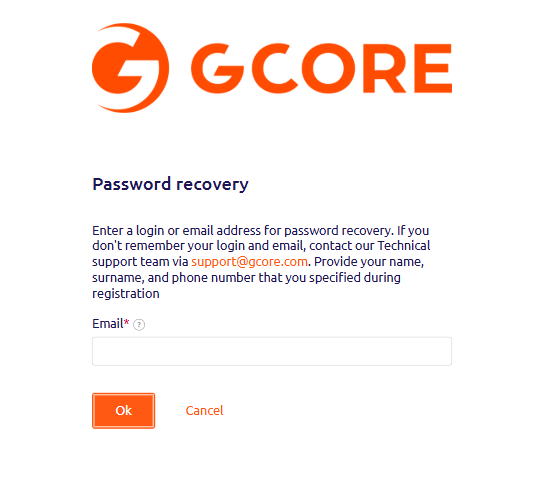
Forgotten passwords can be reset by email verification. Submit the account email on the [recovery page](https://hosting.gcore.com/billmgr?func=recovery) and click **Ok**.
3. In the **Password** field, enter the new password. It must be at least eight characters long and include at least one uppercase letter and one digit.
4. In the **Confirmation** field, re-enter the new password.
5. Click **Ok**.
## Recover a forgotten password
Forgotten passwords can be reset by email verification. Submit the account email on the [recovery page](https://hosting.gcore.com/billmgr?func=recovery) and click **Ok**.
 A recovery email arrives from [billing@gcore.com](mailto:billing@gcore.com) with the subject **Password Recovery**. If it does not arrive within a few minutes, look in the spam folder. If the email is still missing, submit the request again on the [recovery page](https://hosting.gcore.com/billmgr?func=recovery).
After three failed login attempts, the account is temporarily locked. To unlock it, contact support via chat on [gcore.com](https://gcore.com).
A recovery email arrives from [billing@gcore.com](mailto:billing@gcore.com) with the subject **Password Recovery**. If it does not arrive within a few minutes, look in the spam folder. If the email is still missing, submit the request again on the [recovery page](https://hosting.gcore.com/billmgr?func=recovery).
After three failed login attempts, the account is temporarily locked. To unlock it, contact support via chat on [gcore.com](https://gcore.com).