> ## Documentation Index
> Fetch the complete documentation index at: https://docs.preprod.world/llms.txt
> Use this file to discover all available pages before exploring further.
# Order a Windows Server
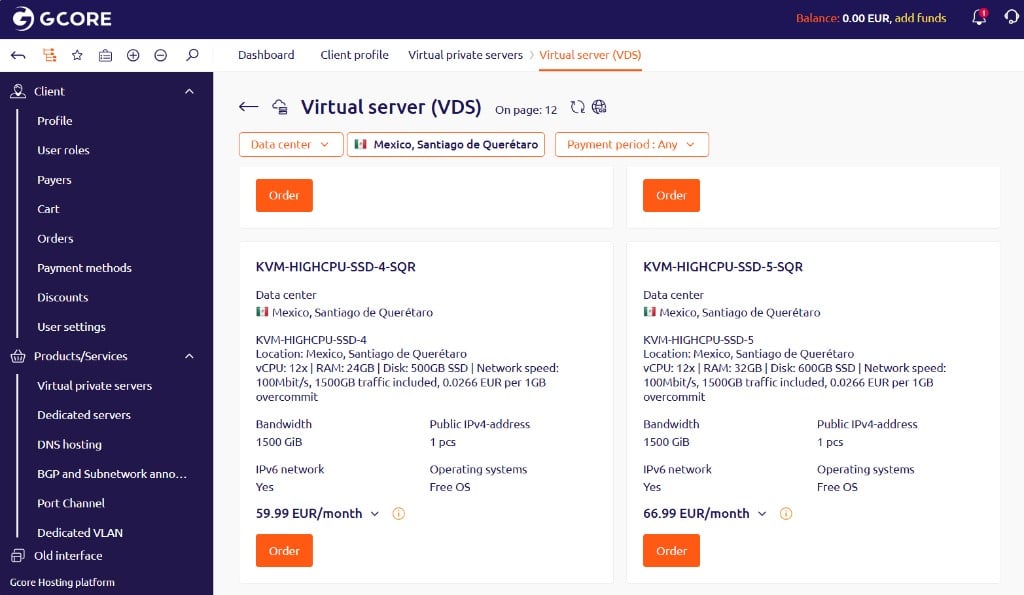
Windows Server is available on KVM-SSD-4 and KVM-HIGHCPU-SSD-4 plans and higher. The license adds EUR 25.00 to the monthly cost.
In the [Hosting portal](https://hosting.gcore.com/billmgr), navigate to **Virtual private servers** and click **Order**.
Use the **Data center** filter to select a region. KVM-SSD-4 and KVM-HIGHCPU-SSD-4 plans and higher display the **Operating systems: Free OS** tag — these support Windows Server. Click **Order** on the plan.
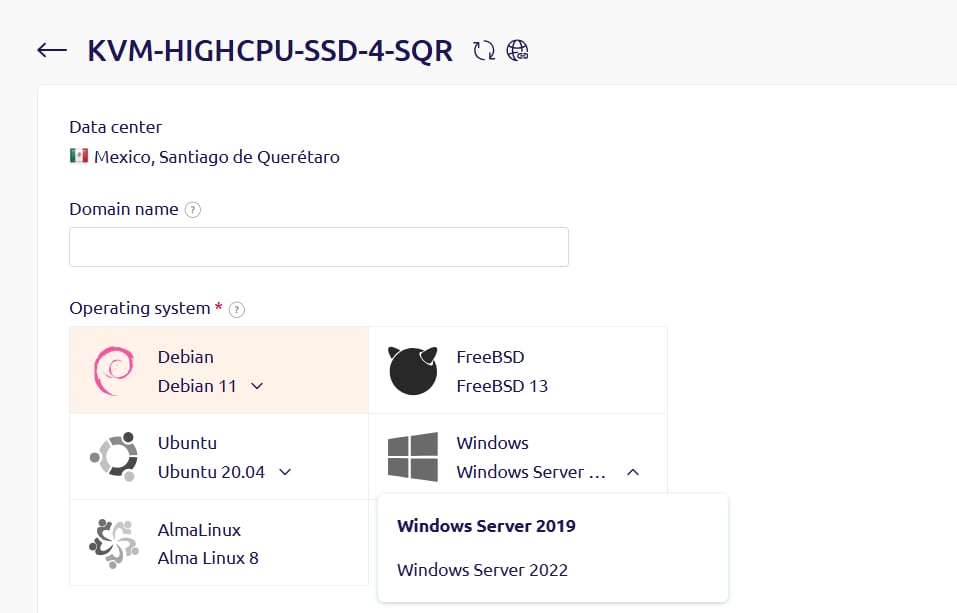
 In the **Operating system** field, select **Windows**, then select a version.
 Configure the remaining options, then click **Registration and payment**.
## Windows Server notes
Keep these constraints in mind before ordering.
* Windows Server can only be selected at order time. It cannot be added to a server that was ordered with a Linux OS.
* Reinstalling with Linux via an [OS template](/hosting/virtual-servers/manage/operating-system/install-a-linux-os-from-a-template) is possible, but the Windows license fee continues to be charged. Reinstalling Windows afterward requires contacting support.
To avoid reinstallation constraints, create separate servers for Windows and Linux rather than reinstalling the same server.
Configure the remaining options, then click **Registration and payment**.
## Windows Server notes
Keep these constraints in mind before ordering.
* Windows Server can only be selected at order time. It cannot be added to a server that was ordered with a Linux OS.
* Reinstalling with Linux via an [OS template](/hosting/virtual-servers/manage/operating-system/install-a-linux-os-from-a-template) is possible, but the Windows license fee continues to be charged. Reinstalling Windows afterward requires contacting support.
To avoid reinstallation constraints, create separate servers for Windows and Linux rather than reinstalling the same server.